Both windows at once
The five hour session and the seven day allowance, each with a live countdown to the moment it resets.
A small macOS menu bar app that turns your live session and weekly usage into a little creature who fills up as you spend. It checks once every sixty seconds.
Free and open source. Needs macOS with Claude Code signed in.
Clone the repository and build it yourself. Windows and Linux are waiting for someone.
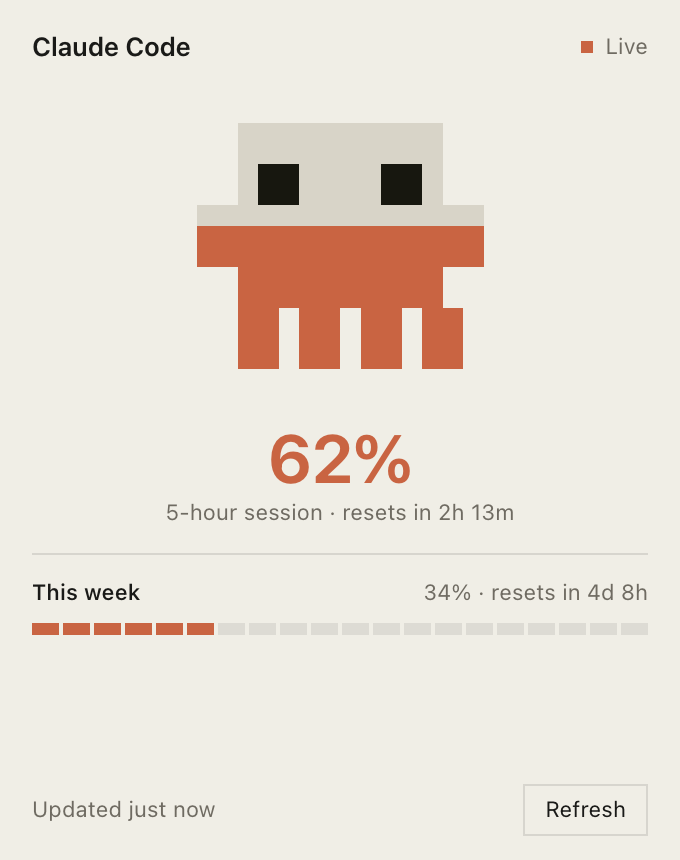
At a glance
The icon lives in your menu bar with the exact figure beside it. Empty at the start of a session, full by the time you hit the limit.

You should never have to guess whether you have twenty minutes of Claude Code left, or four hours. Now it is on screen, all the time.
Open source
To ask Anthropic how much you have spent, Claude Tracker needs the token Claude Code already stored on your Mac. That token sits in the macOS Keychain, and macOS will ask your permission the first time.
You should not have to take anyone's word for what happens next. An app that asks for a credential owes you the ability to check it, so every line that touches your token is public and readable in an afternoon.
The whole of the credential handling is one shell command and one HTTPS request. Nothing is stored, nothing is forwarded, and there is no server of ours anywhere in the path.
# ask macOS for the token Claude Code saved
security find-generic-password \
  -s "Claude Code-credentials" -w

# then one request, straight to Anthropic
GET https://api.anthropic.com/api/oauth/usage
  Authorization: Bearer <that token>
What it does
The five hour session and the seven day allowance, each with a live countdown to the moment it resets.
Read from the macOS Keychain and sent only to Anthropic. No account, no telemetry, nothing in between.
A check every sixty seconds in the background. The countdown keeps ticking between checks, so nothing looks frozen.
If a check fails it keeps your last reading and marks it stale, rather than showing you a confident zero.
How it works
Claude Code keeps its OAuth token under Claude Code-credentials. macOS asks your permission the first time and stays quiet after that.
One request, straight from your Mac, to the same endpoint Claude Code uses for its own usage display.
The icon, the percentage and any open panel update together. Then it waits a minute and does it again.
One thing worth knowing. The usage figures come from an endpoint Anthropic has not documented or published. It could change shape, or stop answering, with no notice.
The app is built expecting exactly that. If a response comes back in a form it does not recognise, it keeps showing your last good reading and flags it as stale instead of inventing a number.
Questions
Because it asks for access to your Keychain. Any app that wants a credential should be one you can inspect, and a closed one asking for the same thing would deserve more suspicion than it could answer. Clone it, read it, build it yourself.
That warning appears for any app Apple has not notarized, which needs a paid Apple developer account this project does not have. It is not a finding about the app, only the absence of a receipt from Apple.
To open it the first time: right click the app in Finder, choose Open, then confirm. macOS remembers the decision and will not ask again. If you would rather not click past a warning at all, clone the repository and build it yourself, since an app built on your own machine opens with no warning.
Only to Anthropic. The app reads the token from your Keychain and sends it as a bearer token on one request to the usage endpoint. There is no server of ours in the path, no analytics, and nothing is written anywhere but your own machine.
The rolling five hour session window and the seven day allowance. Both are shown with the percentage used and a countdown to the moment they reset.
No. It is an independent project and it is not affiliated with or endorsed by Anthropic. It reads a usage endpoint that Claude Code itself calls, which Anthropic has never published.
The parser treats every field as optional and checks two places for each figure. If a response arrives that it cannot read, it keeps your last good reading, marks the panel stale, and tells you why rather than showing a zero.
Yes. The app has no login of its own. It borrows the credentials Claude Code already stored when you signed in, so if you have never signed in there is nothing for it to read.
Not today, but nothing structural is in the way. The credential read uses the macOS Keychain and the icon is drawn as a macOS template image, so those two pieces need replacing. Everything around them is ordinary PHP.
Both ports are open and nobody has claimed them. Here is what porting actually takes.
Contribute
Claude Tracker is built with Laravel and NativePHP, so the polling, the parsing and the panel are all ordinary PHP. There is no Swift in it and nothing to learn first. If you can read a Laravel app, you can port this one.
Unclaimed. Nobody has started it.
Unclaimed. Nobody has started it.
On macOS the token comes out of the Keychain with a single security call. Claude Code keeps the same token elsewhere on Windows and Linux. Swap that one read and the rest of the app does not notice.
The mascot is a macOS template image, sized and coloured for the menu bar. Windows and Linux trays want their own asset, their own sizes and their own click behaviour.
NativePHP already targets all three platforms. Someone needs to run the build, fix whatever falls over, and leave notes so the next person does not start from nothing.
Open an issue before you open a pull request. Say which platform you are taking, so two people do not port the same thing twice.
Small pull requests are easier to read than one large one, and a rough port that runs is worth more than a perfect one that never lands. Bug reports and questions from PHP developers who have never touched a desktop app are welcome too.